Overview
There are four main types of data that the EFM Emerson ROC driver is capable of getting from an Emerson ROC device. These are:
- TLP data
- Alarm Data
- Event Data
- History Data
TLPs are polled at a specified interval based on a poll rate and then made available via the OPC-UA interface.
Alarms, events, and history are made available to MQTT Transmission to be published as immutable Record objects to an MQTT server. Typically these would be received by the MQTT Engine and MQTT Recorder modules running on a central Ignition Gateway and inserted into a database for later use or to be made available to other third party systems.
Common File Exchange (CFX) can also be used for these record data.
Prerequisites
- Knowledge of Ignition and Cirrus Link Module Installation process
- Knowledge of MQTT Engine and MQTT Transmission configurations
- Installation of MQTT Engine, MQTT Transmission and MQTT Recorder (v4.0.x if using Ignition 8.1.x)
- Installation of latest EFM Emerson ROC module
Definitions
| Module | Parameter | Definition |
|---|
| EFM Emerson ROC Settings | TLP Definitions (Global) | The global TLP definitions made available to the EFM Emerson ROC module. They are uploaded to the Ignition instance in the form of specifically formatted CSV files. These TLP definitions can be reference by the configurations of the individual ROC devices that they apply to. A single Ignition Gateway may contain multiple global TLP definitions files that are used to configure different device types where the actual point types & parameters of the individual TLPs may differ across the different files and device types. |
| EFM Emerson ROC Settings | EFM Configuration Mappings | The configuration mapping files are used for building up EFM Configuration Records. They define which TLPs map to which fields (columns) in an EFM Configuration Record. Additionally they can provide bit and/or value mappings for the TLP values. They are uploaded to the Ignition instance in the form of specifically formatted CSV files. |
| EFM Emerson ROC Settings | EFM Periodic Mappings | The periodic mapping files are used for building up EFM Periodic History Records. They define which TLPs map to which fields (columns) in an EFM Periodic History Record, the logical type of the point type table (meter, station, or input), and an archive type of the value. They are uploaded to the Ignition instance in the form of specifically formatted CSV files. |
| OPC UA Device Connection | TLP Definitions | These are a subset of the global TLP definition files that apply to a specific device. |
| OPC UA Device Connection | TLP Templates | TLP templates are logical groupings of TLPs. Generally TLP templates would be created so that instances of them can be used by specifying a poll group with a logical number (the 'L' parameter in a TLP). |
| OPC UA Device Connection | TLP Poll Groups | Poll groups use TLP templates in conjunction with a logical number to create a specific set of TLPs to be polled at a specified poll rate. |
Configuration Steps
There are six basic steps to getting all of the data available from a ROC into Ignition
- From EFM Emerson ROC Settings, define/upload the global TLP definitions available for all ROC devices in this Ignition instance
- From EFM Emerson ROC Settings, define/upload the EFM Mappings for all ROC devices in this Ignition Instance
- From OPC UA Device Connections, create the device connection to the ROC
- For this device Connection, specify the subset of TLP definitions that this specific ROC uses
- For this device connection, create TLP Template(s) which define groups of TLPs should be polled as a logical group
- For this device connection, create TLP Poll Group(s) which specify the logical parameters associated with a given TLP Template
Viewing Device TLP Data
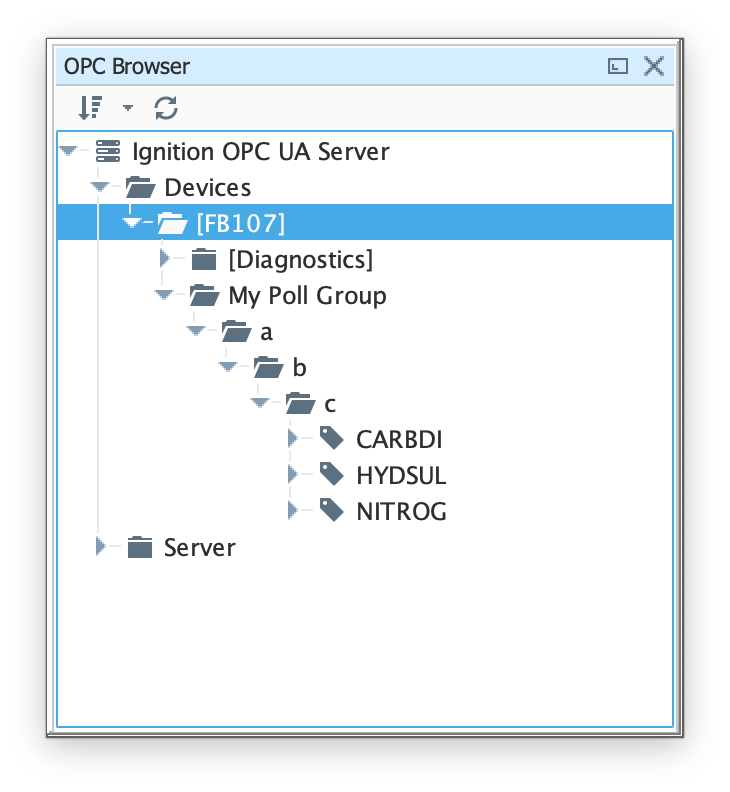
At this point the ROC device should be fully configured. To view data in Ignition launch Ignition Designer and open the OPC Tag Browser as shown below.
You should see the tags being polled from the ROC device as shown below. You can use these tags as any standard OPC tags in Ignition.
Viewing Record Data
Record data can be viewed in a couple of ways:
- Using Common File Exchange (CFX)
- Publishing as an immutable record object
Using Common File Exchange (CFX)
If using Common File Exchange (CFX), the record data will be stored/maintained in CFX.MD5 files on the local Ignition instance. See the Emerson ROC Device Connection configuration for more details.
These files can be transferred from the Edge device using any method you choose such as FTP but can also be published using the MQTT Transmission File Publishing option.
To do this, you will need to configure an MQTT Transmission File Record and set the CFX File Transfer parameter to point to that File Record and the CFX files can then be automatically published. See the Creating and Publishing Common Exchange File CFX tutorial for details.
Publish as an immutable record object
To publish view record data which includes ROC alarms, events, and history data you must have MQTT Transmission installed on the instance with the EFM Emerson ROC driver.
In addition, the following must be set up:
At the Central Gateway:
At the Edge Gateway
When all of these conditions are met, alarm, event, and/or history data will be collected, published, and stored via MQTT Recorder in the configured database.
Additional Resources
- Inductive Automation's Ignition download with free trial
- Cirrus Link Solutions Modules for Ignition
- Support questions
- Sales questions
- About Cirrus Link

