...
TLPs are polled at a specified interval based on a poll rate and then made available via the OPC-UA interface.
Alarms, events, and history are made available to MQTT Transmission to be published as immutable Record objects to an MQTT server. Typically these would be received by the MQTT Engine and MQTT Recorder modules running on a central Ignition Gateway and inserted into a database for later use or to be made available to other third party systems.
Common File Exchange (CFX) can also be used for these record data.
Prerequisites
...
- From EFM Emerson ROC Settings, define/upload the global TLP definitions available for all ROC devices in this Ignition instance
- From EFM Emerson ROC Settings, define/upload the EFM Mappings for all ROC devices in this Ignition Instance
- From OPC UA Device Connections, create the device connection to the ROC
- For this device Connection, specify the subset of TLP definitions that this specific ROC uses
- For this device connection, create TLP Template(s) which define groups of TLPs should be polled as a logical group
- For this device connection, create TLP Poll Group(s) which specify the logical parameters associated with a given TLP Template
...
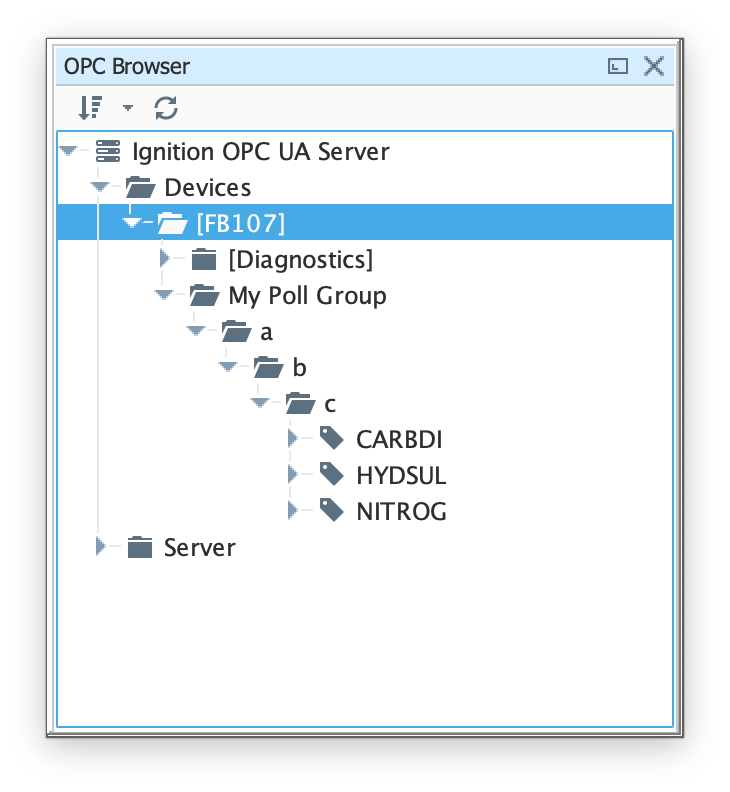
You should see the tags being polled from the ROC device as shown below. You can use these tags as any standard OPC tags in Ignition.
| Anchor |
|---|
| ViewRecordData |
|---|
| ViewRecordData |
|---|
|
Viewing ...
Record Data
Record data can be viewed in a couple of ways:
- Using Common File Exchange (CFX)
- Publishing as an immutable record object
Using Common File Exchange (CFX)
If using Common File Exchange (CFX), the record data will be stored/maintained in CFX.MD5 files on the local Ignition instance. See the Emerson ROC Device Connection configuration for more details.
These files can be transferred from the Edge device using any method you choose such as FTP but can also be published using the MQTT Transmission File Publishing option.
To do this, you will need to configure an MQTT Transmission File Record and set the CFX File Transfer parameter to point to that File Record and the CFX files can then be automatically published. See the Creating and Publishing Common Exchange File CFX tutorial for details.
Publish as an immutable record object
To publish To view record data which includes ROC alarms, events, and history data you must have MQTT Transmission installed on the instance with the EFM Emerson ROC driver.
In addition, the following must be set up:
At the Central Gateway:
...
When all of these conditions are met, alarm, event, and/or history data will be collected, published, and stored via MQTT Recorder in the configured database.
| Excerpt Include |
|---|
| CLD80:FAQ: Ignition Modules |
|---|
| CLD80:FAQ: Ignition Modules |
|---|
| nopanel | true |
|---|
|
...

