The MQTT Sparkplug specification has a limit of 256MB for messages.
The two likely causes of large messages are:
- MQTT Sparkplug BIRTH and DEATH message lengths
- Slow tag pacing
MQTT Sparkplug BIRTH and DEATH message lengths
As required by the Sparkplug Specification data is published on NBIRTH, NDEATH, DBIRTH and DDEATH topics.
The payloads for each of these messages include every metric the device will ever report on. At a minimum these metrics must include the name, datatype and current value.
If you have large number of tags in a single folder, these messages can easily exceed any broker limits.
Slow tag pacing
Tag pacing is the buffer period for outgoing Transmission messages which allows tag change events to be buffered to reduce the number of generated MQTT messages. If you set this pacing too slow, with a large volume of tag changes, messages can easily exceed any broker limits.
How to find your largest message size
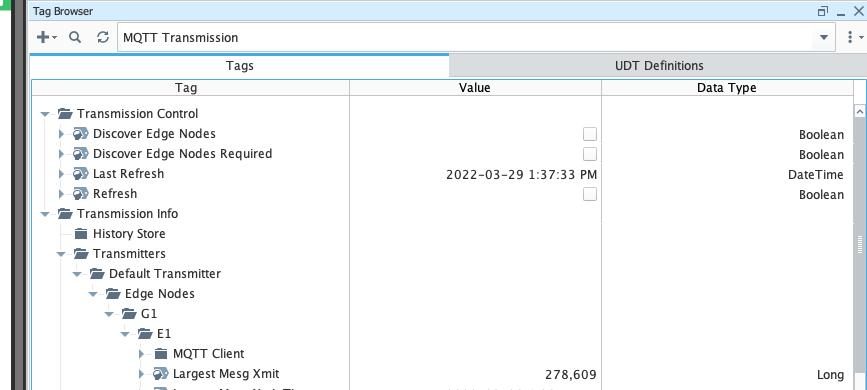
To find the largest published message size, navigate to the MQTT Transmission in the Ignition Designer Tag Browser. Drill down to your Transmitter and you should see the ‘Largest Mesg Xmit’ tag as shown below.
Resolution
- Configure the Transmitter to use a compression algorithm to compress the payload before publishing
- Modify your tag structure such that no messages exceed your message size limit
- This typically means dividing tags up across ‘Device level folders’ so the size of each NBIRTH, NDEATH, DBIRTH or DDEATH message is less than your message size limit
- Check that your Tag Pacing period is not causing messages greater than your message size limit to be generated.
- Wireshark can be helpful in performing this tuning.
Unable to Resolve?
If the troubleshooting tips did not help you resolve your issues, please open a ticket with Support making sure to include the MQTT Engine or MQTT Transmission logs as appropriate.
From the Ignition Logs view, select the Download icon to download a copy of the system-name.idb file to your local file system. You will need to compress (zip, 7z or rar) this file before sending to Support.
Additional Resources
- Inductive Automation's Ignition download with free trial
- Cirrus Link Solutions Modules for Ignition
- Support questions
- Sales questions
- About Cirrus Link

