Overview
The MQTT Transmission UNS Transmitter is an agent that monitors tags and publishes them as MQTT Messages with a JSON payload to an MQTT Server.
It is ideal for lightweight IT deployments where minimal data points are required by Enterprise consuming clients and is generally used on the IT side of an OT/IT infrastructure.
- The UNS Transmitter creates an MQTT Client(s)
- After connection to the MQTT server, data can only be published from the MQTT Client to the MQTT Server
- The UNS Transmitter MQTT Client has no subscriptions and so will not receive commands from Enterprise consuming clients
- Uses LWT to maintain system state awareness
- Publishes a properties message for each tag on a client connection
- Data can be published as QoS0, QoS1 or QoS2
- Is limited to publishing a single data message for each tag change event
- The published messages can be consumed by any MQTT Client
- The topic is the identified Ignition tag path
- The payload contains only the tag name, dataType, value, timestamp and quality formatted as JSON
- Publishes the leaf tags of Ignition UDTs (a.k.a. Sparkplug Templates) and the structure of the UDT (i.e. UDT name itself and folders in the UDT) become topic tokens
The 'topic per datapoint' strategy is very expensive from a resource perspective on both the MQTT clients as well as the MQTT Server. Review Which MQTT Transmission Transmitter should I use to make sure you are using the appropriate MQTT Transmission Transmitter for your application. |
Configuration
Configuration is set under the MQTT Transmission > UNS Transmitter tab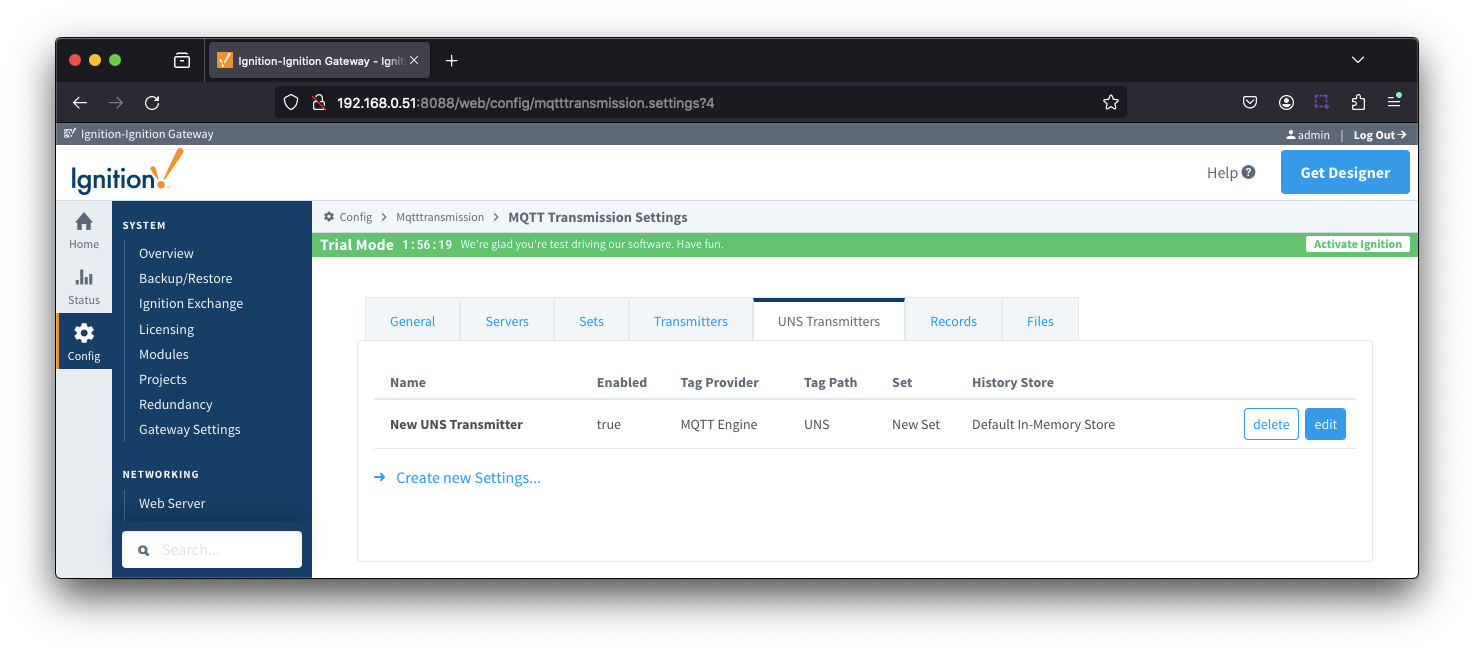
The configuration sections available are Tag Settings, Publish Settings, History Settings and Advanced Settings.
UNS Transmitters - Tag Settings
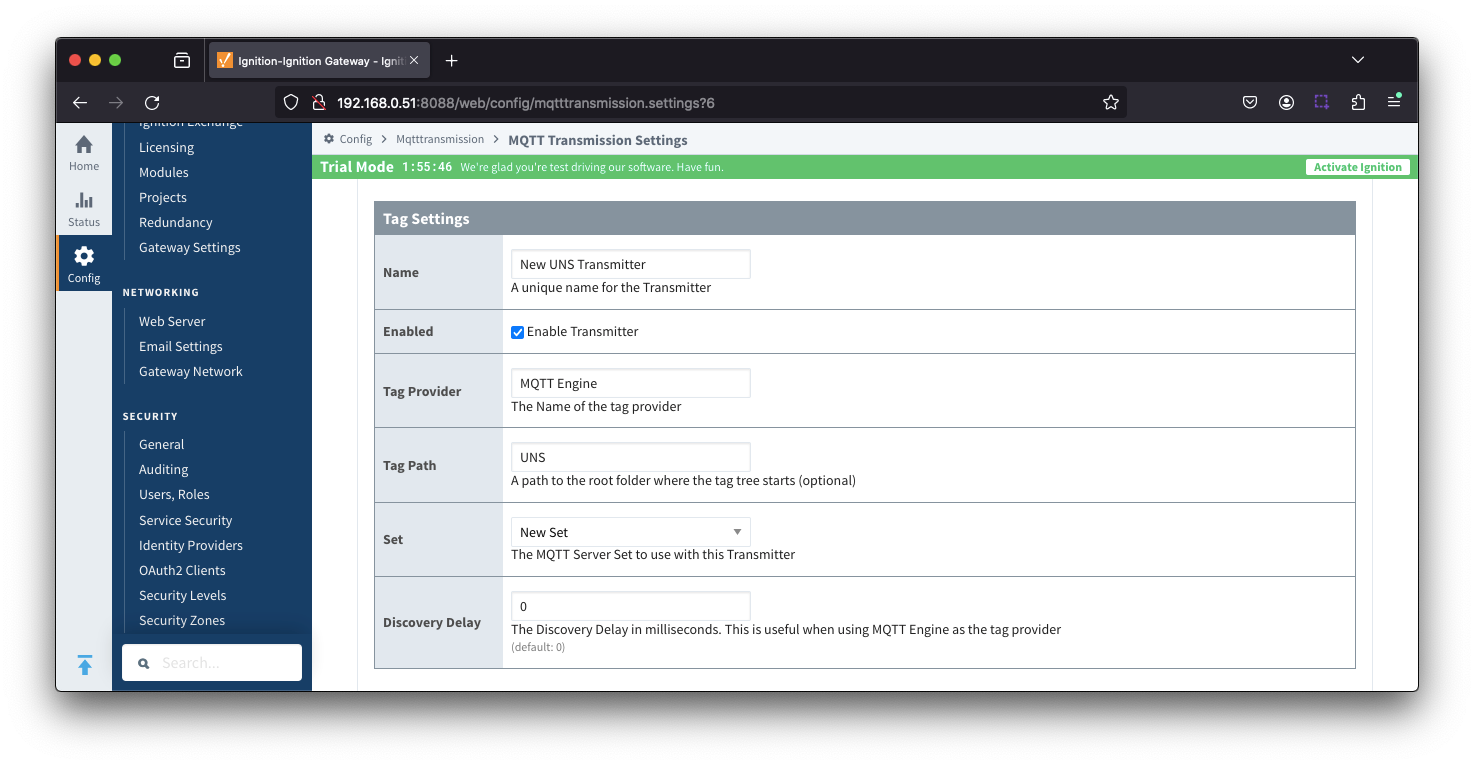
- Name
- Unique name for the UNS Transmitter
- Enabled
- Checkbox to enable/disable the UNS Transmitter. Selected by default.
- Tag Provider
- The name of the tag provider that Transmission will monitor.
- Tag Path
- Optional path to the root folder where the tag tree starts.
- Transmitters also support a multi-tag path configuration. Reference the Transmitters with Multi-Tag Paths tutorial for configuration assistance.
- Set
- The Set that the UNS Transmitter client will connect to.
- Discovery Delay
- An optional startup delay, in milliseconds, to wait before scanning for Tags to monitor. This is useful when Tags are dynamically created on initial startup, as is the case when using the MQTT Engine module.
UNS Transmitters - Publish Settings
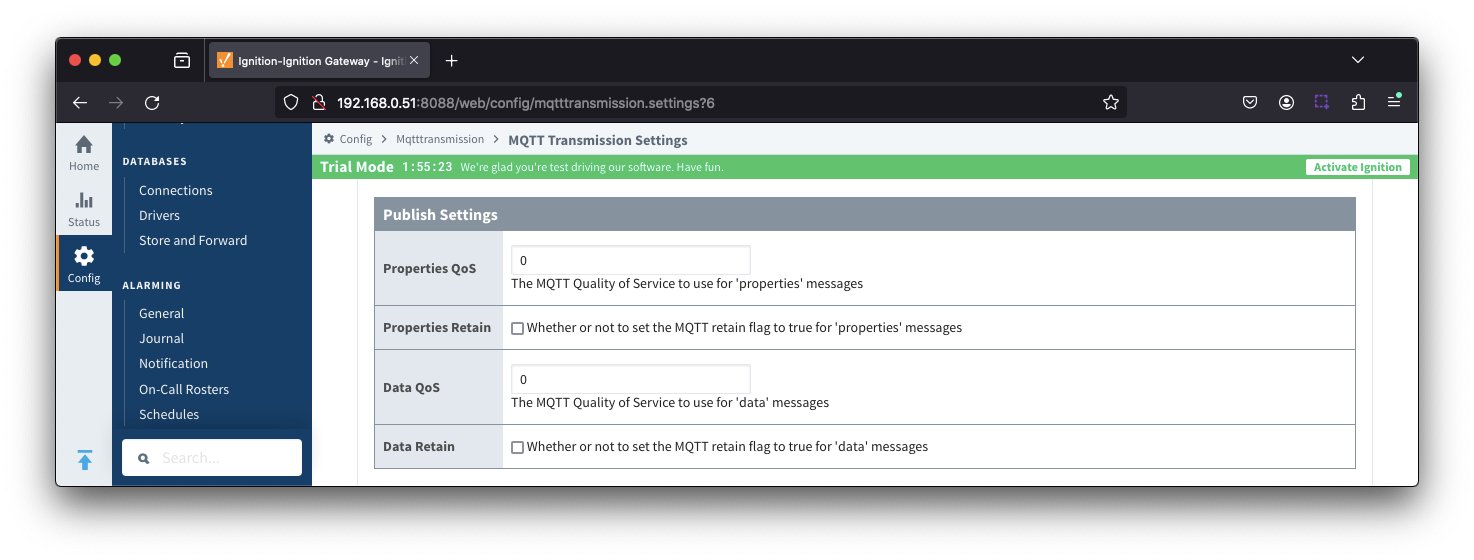
- Properties QoS
- The MQTT Quality of Service to use for 'properties' messages
- Properties Retain
- Whether or not to set the MQTT retain flag to true for 'properties' messages
- Data QoS
- The MQTT Quality of Service to use for 'data' messages
- Data Retain
- Whether or not to set the MQTT retain flag to true for 'data' messages
UNS Transmitters - History Settings
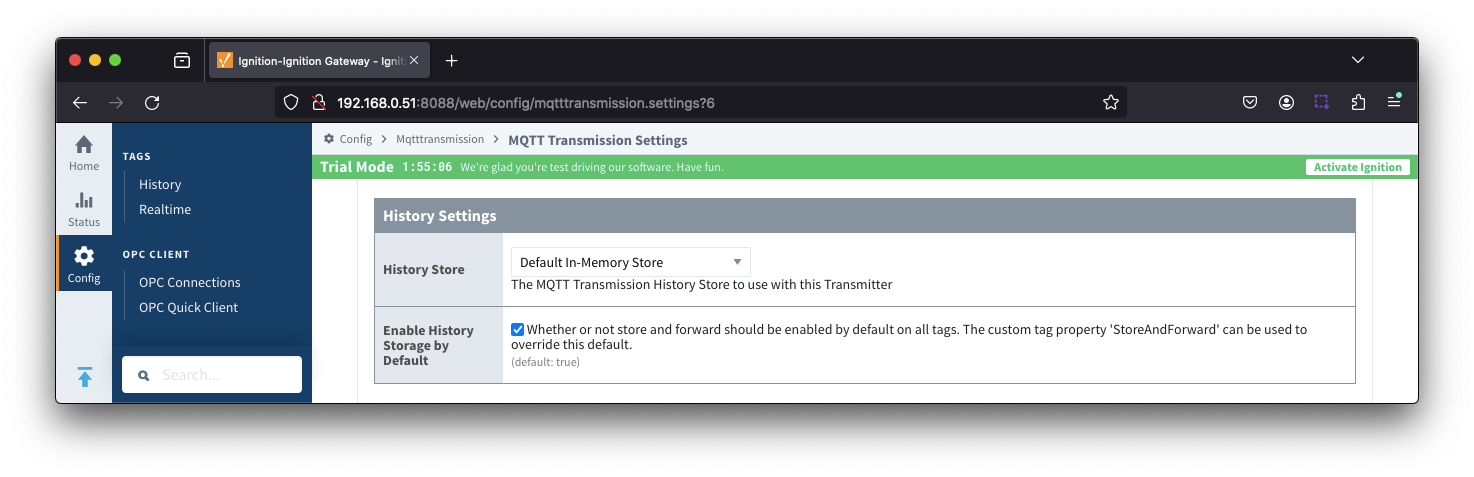
- History Store
- The MQTT Transmission History Store to use with the UNS Transmitter.
- Enable History Storage by Default
- Checkbox to enable/disable store and forward for all tags. Selected by default.
- Store and forward controls whether or not a tag is stored in the configured History Store when Transmission is offline. To override the global setting, individual tags will require a custom tag property 'StoreAndForward' (type: boolean) to be created and set to the reverse state of the global setting.
UNS Transmitters - Advanced Settings
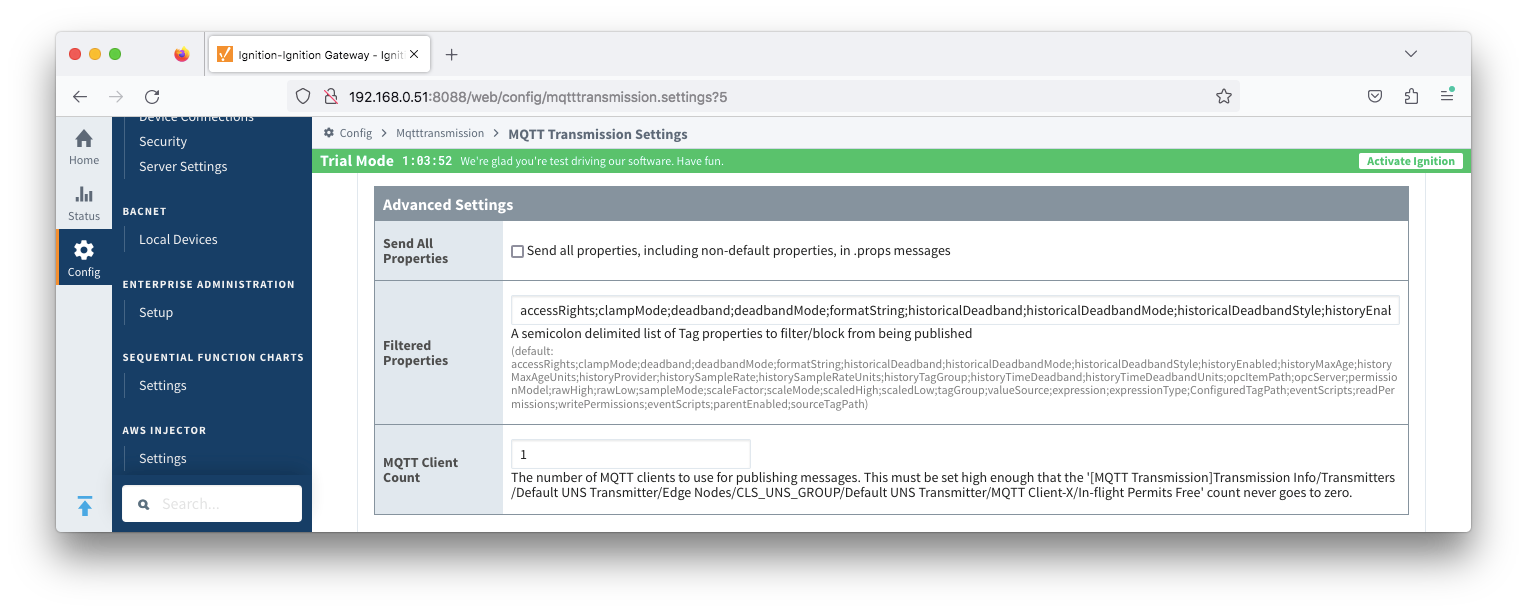
- Send All Properties
- Send all properties, including default properties, in .props messages
- Filtered Properties
- A semicolon delimited list of Tag properties to filter/block from being published
By default the filtered properties list contains:
accessRights;clampMode;deadband;deadbandMode;formatString;historicalDeadband;historicalDeadbandMode;historicalDeadbandStyle;historyEnabled;historyMaxAge;historyMaxAgeUnits;historyProvider;historySampleRate;historySampleRateUnits;historyTagGroup;historyTimeDeadband;historyTimeDeadbandUnits;opcItemPath;opcServer;permissionModel;rawHigh;rawLow;sampleMode;scaleFactor;scaleMode;scaledHigh;scaledLow;tagGroup;valueSource;expression;expressionType;ConfiguredTagPath;eventScripts;readPermissions;writePermissions;eventScripts;parentEnabled;sourceTagPath- Tag properties are only published if different from the default Ignition tag property settings.
- MQTT Client Count - added in 4.0.31
- The number of MQTT clients to use for publishing messages. This must be set high enough that the '[MQTT Transmission]Transmission Info/Transmitters/Default UNS Transmitter/Edge Nodes/CLS_UNS_GROUP/Default UNS Transmitter/MQTT Client-X/In-flight Permits Free' count never goes to zero.
How it Works
For each tag, identified under the configured Tag Path, the UNS Transmitter will publish two MQTT messages:
- A data message published for each tag when QualifiedValue of the tag changes
- A properties message published for each tag on every client connection.
The UNS Transmitter will use the namespace unsAv1.0 and will prefix this to all publishes from the MQTT Transmission UNS Transmitter
| The UNS namespace may be disabled via script using the "UseTopicPrefixToken" parameter |
UNS Message Formats
 UNS Data Message
A single MQTT message is published for each tag when the QualifiedValue of the tag changes
- Topic
- Ignition tag path starting at the Tag Path defined in the UNS transmitter
- unsAv1.0/Enterprise/Site 1/Area 1/BMS/Rooftop/Cooler/Fan Speed
- Ignition tag path starting at the Tag Path defined in the UNS transmitter
- Payload
- JSON formatted payload containing tag name, dataType, value, timestamp and qualityCode
- {"name":"Enterprise/Site 1/Area 1/BMS/Rooftop/Cooler/Fan Speed","dataType":"Int32","value":120,"timestamp":1727215043878,"qualityCode":192}
- JSON formatted payload containing tag name, dataType, value, timestamp and qualityCode
 UNS Properties Message
| A single MQTT message, containing the tag properties, is published for each tag on every client connection. |
| Tag properties are only included if different from the default Ignition tag property settings unless configuration property Send All Properties is True |
- Topic
- Ignition tag path starting at the Tag Path defined in the transmitter extended by .props
- unsAv1.0/Enterprise/Site 1/Area 1/BMS/Rooftop/Cooler/Fan Speed.props
- Ignition tag path starting at the Tag Path defined in the transmitter extended by .props
- Payload
- JSON formatted payload containing non default or custom property values
- {"SparkplugEdgeNodeId":{"type":"String","value":"Site 1 A"},"SparkplugGroupId":{"type":"String","value":"Enterprise"},"enabled":{"type":"Boolean","value":true},"SparkplugDeviceId":{"type":"String","value":"UNS"}}
- JSON formatted payload containing non default or custom property values
Examples
Using the UNS Transmitter to publish from MQTT Engine
Let's take a look at a an example of how a UNS Transmitter can be used to publish data in a UNS format at MQTT Engine.
In Creating a UNS Namespace at MQTT Engine we created a UNS namespace at Engine as shown below:
MQTT Engine UNS tag tree
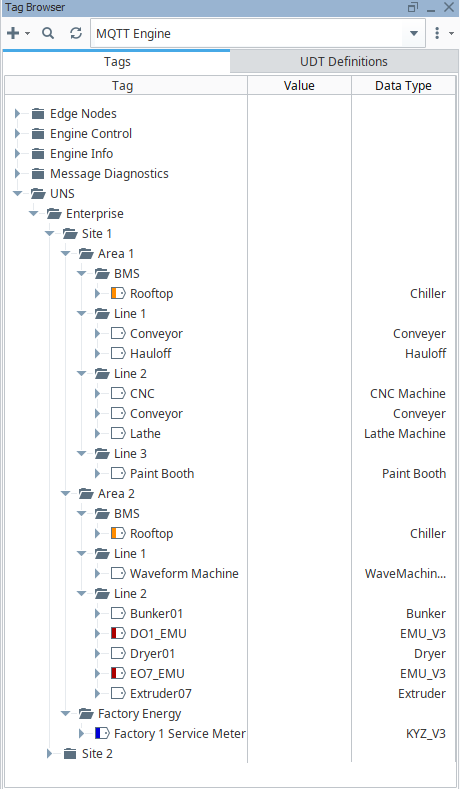
MQTT Engine UNS tag tree Site 1 Area 1 expanded
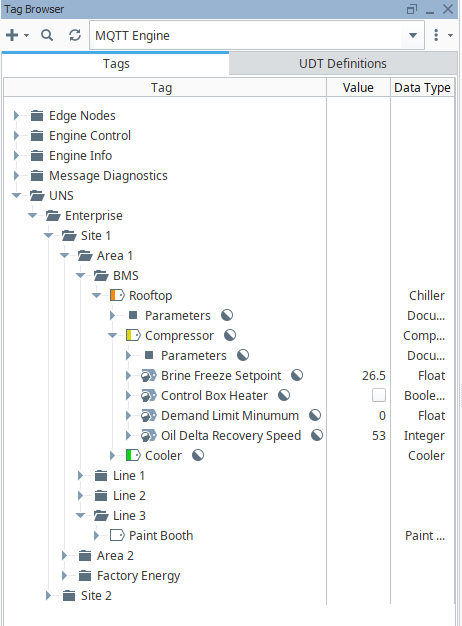
If we set the configuration parameters for the UNS Transmitter such that the Tag Provider is "MQTT Engine" and the Tag Path is = "UNS", a single message will be published each time the Qualified Value changes for a tag below "UNS":
Message examples are:
- unsAv1.0/Enterprise/Site 1/Area 1/BMS/Rooftop/Compressor/Brine Freeze Setpoint
- {"name":"Enterprise/Site 1/Area 1/BMS/Rooftop/Compressor/Brine Freeze Setpoint","dataType":"Real32","value":26.5,"timestamp":1727215043878,"qualityCode":192}
- unsAv1.0/Enterprise/Site 1/Area 1/BMS/Rooftop/Compressor/Control Box Heater
- {"name":"Enterprise/Site 1/Area 1/BMS/Rooftop/Compressor/Control Box Heater","dataType":"Boolean","value":false,"timestamp":1727215043666,"qualityCode":192}
- unsAv1.0/Enterprise/Site 1/Area 1/BMS/Rooftop/Compressor/Demand Limit Minimum
- {"name":"Enterprise/Site 1/Area 1/BMS/Rooftop/Compressor/Demand Limit Minimum","dataType":"Real32","value":0,"timestamp":1727215035612,"qualityCode":192}
- unsAv1.0/Enterprise/Site 1/Area 1/BMS/Rooftop/Compressor/Oil Delta Recovery Speed
- {"name":"Enterprise/Site 1/Area 1/BMS/Rooftop/Compressor/Oil Delta Recovery Speed","dataType":"Int32","value":53,"timestamp":1727215022878,"qualityCode":192}
On a connect by the UNS Transmitter to the MQTT server, a single properties message will be published for each a tag below "UNS".
Message examples are:
- unsAv1.0/Enterprise/Site 1/Area 1/BMS/Rooftop/Compressor/Brine Freeze Setpoint.props
- {"SparkplugEdgeNodeId":{"type":"String","value":"Site 1 A"},"SparkplugGroupId":{"type":"String","value":"Enterprise"},"enabled":{"type":"Boolean","value":true},"SparkplugDeviceId":{"type":"String","value":"UNS"}}
- unsAv1.0/Enterprise/Site 1/Area 1/BMS/Rooftop/Compressor/Control Box Heater.props
- {"SparkplugEdgeNodeId":{"type":"String","value":"Site 1 A"},"SparkplugGroupId":{"type":"String","value":"Enterprise"},"enabled":{"type":"Boolean","value":true},"SparkplugDeviceId":{"type":"String","value":"UNS"}}
- unsAv1.0/Enterprise/Site 1/Area 1/BMS/Rooftop/Compressor/Demand Limit Minimum.props
- {"SparkplugEdgeNodeId":{"type":"String","value":"Site 1 A"},"SparkplugGroupId":{"type":"String","value":"Enterprise"},"enabled":{"type":"Boolean","value":true},"SparkplugDeviceId":{"type":"String","value":"UNS"}}
- unsAv1.0/Enterprise/Site 1/Area 1/BMS/Rooftop/Compressor/Oil Delta Recovery Speed.props
- {"SparkplugEdgeNodeId":{"type":"String","value":"Site 1 A"},"SparkplugGroupId":{"type":"String","value":"Enterprise"},"enabled":{"type":"Boolean","value":true},"SparkplugDeviceId":{"type":"String","value":"UNS"}}
- unsAv1.0/Enterprise/Site 1/Factory Energy/Factory 1 Service Meter/KYZData/KW.props
- {"SparkplugEdgeNodeId":{"type":"String","value":"Site 1 B"},"SparkplugGroupId":{"type":"String","value":"Enterprise"},"enabled":{"type":"Boolean","value":true},"SparkplugDeviceId":{"type":"String","value":"UNS"}}
- unsAv1.0/Enterprise/Site 1/Factory Energy/Factory 1 Service Meter/KYZData/KW.props
- {"SparkplugEdgeNodeId":{"type":"String","value":"Site 1 B"},"SparkplugGroupId":{"type":"String","value":"Enterprise"},"enabled":{"type":"Boolean","value":true},"SparkplugDeviceId":{"type":"String","value":"UNS"}}
| The custom tag properties of SparkplugDeviceId, SparkplugEdgeNodeId and SparkplugGroupID were created when enabling UNS at MQTT Engine |
Using the UNS Transmitter to publish from the Edge
Let's take a second example of publishing directly from the Edge tags using the Edge tags at Site 1 A from Creating a UNS Namespace at MQTT Engine
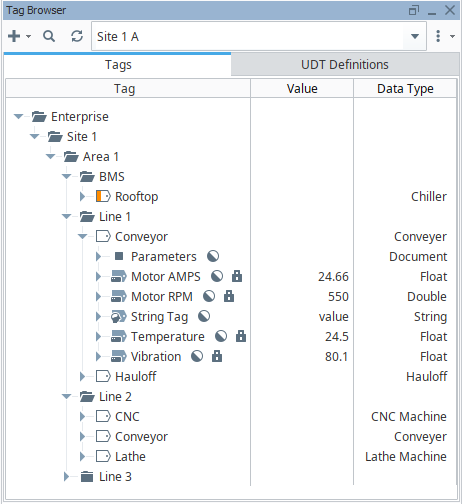
If we set the configuration parameters for the UNS Transmitter such that the Tag Provider is "Site 1 A" and the Tag Path is = "", a single message will be published each time the Qualified Value changes for a tag:
Message examples are:
- unsAv1.0/Enterprise/Site 1/Area 1/Line 1/Conveyor/Motor AMPS
- {"name":"Enterprise/Site 1/Area 1/Line 1/Conveyor/Motor AMPS","dataType":"Real32","value":24.66,"timestamp":1727215043878,"qualityCode":192}
- unsAv1.0/Enterprise/Site 1/Area 1/Line 1/Conveyor/Motor RPM
- {"name":"Enterprise/Site 1/Area 1/Line 1/Conveyor/Motor RPM","dataType":"Real64","value":550,"timestamp":1727215042222,"qualityCode":192}
- unsAv1.0/Enterprise/Site 1/Area 1/Line 1/Conveyor/String Tag
- {"name":"Enterprise/Site 1/Area 1/Line 1/Conveyor/String Tag","dataType":"String","value":"value","timestamp":1727215043156,"qualityCode":192}
- unsAv1.0/Enterprise/Site 1/Area 1/Line 1/Conveyor/Temperature
- {"name":"Enterprise/Site 1/Area 1/Line 1/Conveyor/Temperature","dataType":"Real32","value":24.5,"timestamp":1727215010567,"qualityCode":192}
- unsAv1.0/Enterprise/Site 1/Area 1/Line 1/Conveyor/Vibration
- {"name":"Enterprise/Site 1/Area 1/Line 1/Conveyor/Vibration","dataType":"Real32","value":80.1,"timestamp":172721508741023,"qualityCode":192}
On a connect by the UNS Transmitter to the MQTT server, a single properties message will be published for each a tag
Message examples are:
- unsAv1.0/Enterprise/Site 1/Area 1/Line 1/Conveyor/Motor AMPS.props
- {"enabled":{"type":"Boolean","value":true}}
- unsAv1.0/Enterprise/Site 1/Area 1/Line 1/Conveyor/Motor RPM.props
- {"enabled":{"type":"Boolean","value":true}}
- unsAv1.0/Enterprise/Site 1/Area 1/Line 1/Conveyor/String Tag.props
- {"enabled":{"type":"Boolean","value":true}}
- unsAv1.0/Enterprise/Site 1/Area 1/Line 1/Conveyor/Temperature.props
- {"enabled":{"type":"Boolean","value":true}}
- unsAv1.0/Enterprise/Site 1/Area 1/Line 1/Conveyor/Vibration.props
- {"enabled":{"type":"Boolean","value":true}}
Extending the MQTT Client count when using the UNS Transmitter
The UNS Transmitter will publish a single data message for each tag change event.
Depending on the tag count, frequency of tag data changes and the QOS (Quality of Service) used, the number of in-flight messages for any individual MQTT client can become unsupportable leading to lost data.
To mitigate this, the UNS Transmitter configuration allows for additional MQTT Clients to be associated with a single UNS Transmitter with an "MQTT Client Count" property is available under the "Advanced Settings" in the configuration.
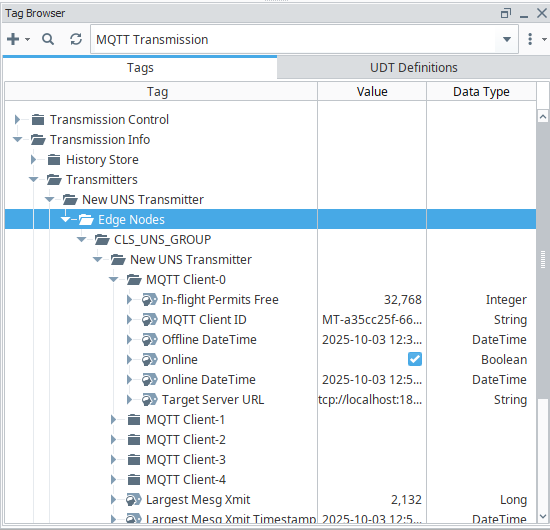
For each MQTT Client there is an In-flight Permits Free tag available under the MQTT Transmission > Transmission Info tag path. The MQTT Client Count should be set high enough such that the In-Flight Permits Free information tag for each MQTT Client never goes to zero.
In the image below, the New UNS Transmitter has been configured with an MQTT Client Count of 5 which are assigned as MQTT Client-0 through MQTT Client-4.