Contents
Cirrus Link Resources
Cirrus Link Website
Contact Us (Sales/Support)
Forum
Cirrus Link Modules Docs for Ignition 7.9.x
Inductive Resources
Ignition User Manual
Knowledge Base Articles
Inductive University
Forum
Cirrus Link Website
Contact Us (Sales/Support)
Forum
Cirrus Link Modules Docs for Ignition 7.9.x
Ignition User Manual
Knowledge Base Articles
Inductive University
Forum
The topic and payload of the Sparkplug message are parsed in different ways to create the Default Tag or UNS Tag folder hierarchy in the MQTT Engine tag provider.
Default Tags
When configured to create Default Tags, MQTT Engine will parse the topic and payload to create tags under the 'Edge Nodes' folder in the MQTT Engine tag provider.
The metric name in the payload is used for the tag name prefixed by the Sparkplug Descriptors from the message topic resulting in a tag path of:
For example the message below:
creates an MQTT Engine tag:
| Note |
|---|
If using MQTT Transmission to publish the message and the Transmitter is configured to dynamically pickup the Sparkplug Descriptors, the metric names used in the payload will be the remainder of the tag folder hierarchy not used in the topic namespace. Prefixing the Sparkplug Descriptors in the topic to the metric name in the payload results in unique tag folder hierarchy's at MQTT Engine |
UNS Tags
When configured to create UNS Tags, MQTT Engine will obfuscate the Sparkplug Descriptors used in the topic and only parse the metric name included in the payload to create the tag structure under the configured UNS Folder prefix.
For example the message below:
creates an MQTT Engine tag:
| Warning |
|---|
It is a requirement of a UNS is that each tag can only be referenced from a single source ie. the same metric name cannot be published from two edge nodes. If MQTT Engine receives a second message payload with a metric name it has already created, it will not create the UNS tag. For example:
will not create an MQTT Engine tag as the tag [MQTT Engine]UNS/Conveyer/Batch/Quantity already exists. |
When using MQTT Transmission to publish the message with the Transmitter configured to dynamically pickup the Sparkplug Descriptors, the metric names used in the payload will be the remainder of the tag folder hierarchy not used in the topic namespace.
This can result in collisions at MQTT Engine with duplicate metric names from different edge nodes.
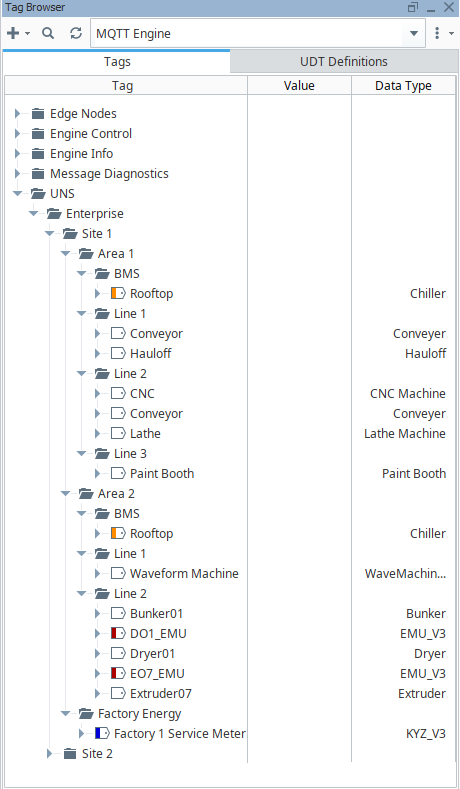
In the example below we have three tag providers simulating edges - Site 1A, Site 1B and Site 2.
Allowing the Transmitters to create the Sparkplug Descriptors dynamically would result in duplicate metric names in messages published to MQTT Engine.
For example:
Site 1 A publishing with topic "Enterprise/Site 1/Area 1" would contain a payload metric of "BMS/Rooftop"
Site 1 B publishing with topic "Enterprise/Site 1/Area 2" would contain a payload metric of "BMS/Rooftop"
Site 2 publishing with topic "Enterprise/Site 2/Area 1" would contain a payload metric of "BMS/Rooftop"
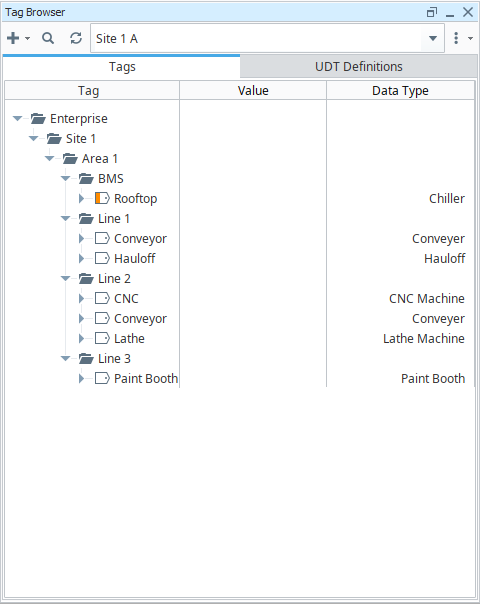
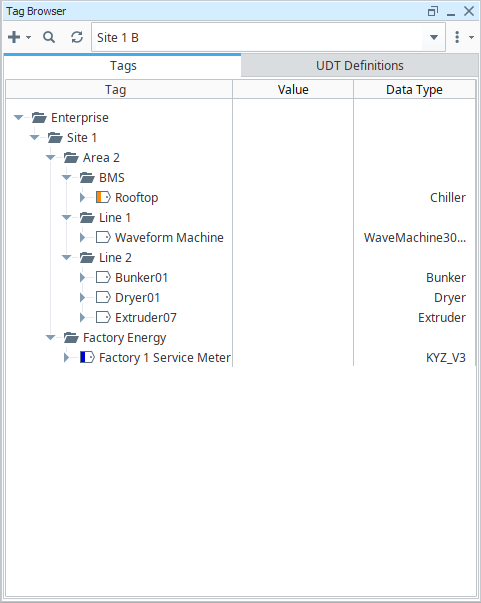
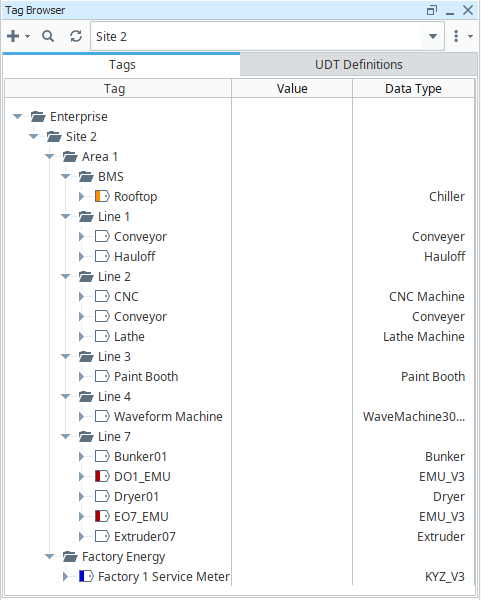
The recommended approach to create unique metric names is to configure the Sparkplug Descriptors used by each Transmitter which allows the full tag folder hierarchy to be used for the metric name.
In the example below we have set the Sparkplug IDs for each Transmitter:
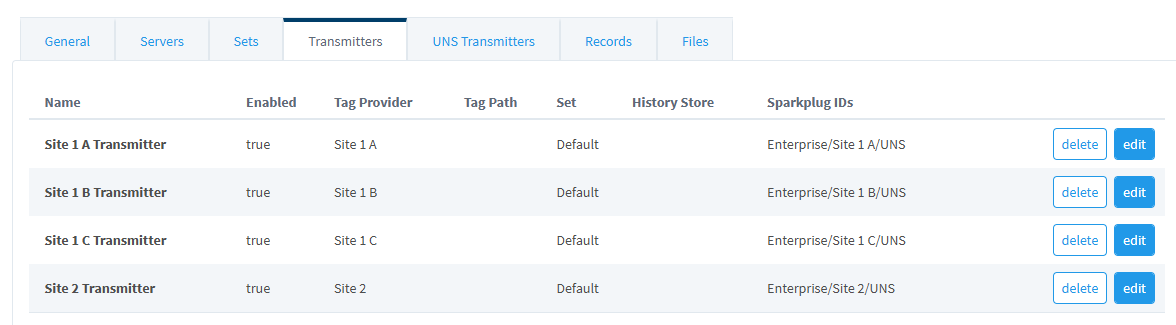
such that
Site 1 A publishing with topic "Enterprise/Site 1 A/UNS" would contain a payload metric of "Enterprise/Site 1/Area 1/BMS/Rooftop"
Site 1 B publishing with topic "Enterprise/Site 1 B/UNS" would contain a payload metric of "Enterprise/Site 1/Area 2/BMS/Rooftop"
Site 2 publishing with topic "Enterprise/Site 2/UNS" would contain a payload metric of "Enterprise/Site 2/Area 1/BMS/Rooftop"
| Note |
|---|
If MQTT Engine is configured for both Default Tags and UNS Tags, this approach will result in some duplication of the folder structure under the Edge Nodes but will ensure that the UNS view is correctly laid out |
At Engine, these tags published from Edge Nodes are then concatenated under the single UNS tag path of UNS > Enterprise