...
Once in the AWS Injector Settings configuration section there are five tabs: General, Kinesis, DynamoDB, Sets, and Tag Agents.
| Tip |
|---|
Prior to release 4.0.22, Disk-Backed History stores are located here ~yourIgnitionInstance\user-lib\cls\data\h2 From release 4.0.22, Disk-Backed History store are located here ~yourIgnitionInstance\data\modules\com.cirrus-link\com.cirruslink.injector.aws.gateway\h2 From release 4.0.25, the The base path for the database location of the Disk-Backed History store is configurable. - The default base path for Linux is ~yourIgnitionInstance\data\modules and the database will be included in the Ignition GWBK
- The default location for Windows Linux is ~yourIgnitionInstance\user-lib\modules and the database will not be included in the Ignition GWBK
- The database file will be created in this directory under the base path com.cirrus-link\com.cirruslink.injector.aws.gateway\h2
|
...
- Store & Forward Enabled
- Whether to enable Store & Forward capabilities for this stream
- Store & Forward Type
- The type of the Store & Forward mechanism options: In_Memory and Disk_Backed (available in release 4.0.17 and higher)
- Data stored with an In_Memory Store & Forward will not be persisted across a module configuration change, module disable/enable, module restart or power loss
- Data stored with a Disk_Backed Store & Forward will persist across a module configuration change, module disable/enable, module restart or power loss
Message Capacity - deprecated in 4.0.19- The maximum number of messages to store before dropping the oldest historical messages
- History Max Size
- The maximum number of megabytes history can use before dropping the data
- In_Memory Store & Forward will use the Ignition Java Heap memory
- Max History Age
- The maximum number of minutes to store history before dropping the data
- Flush Period
- The period of time to wait (in milliseconds) between sending when flushing messages
...
Advanced Store & Forward
- H2 Database Directory - added in 4.0.25
- Directory to store the H2 Database in. Applicable for Disk-backed history store only
- The default base path for Linux is ~yourIgnitionInstance\data\modules and the database will be included in the Ignition GWBK
- The default location for Windows Linux is ~yourIgnitionInstance\user-lib\modules and the database will not be included in the Ignition GWBK
- The database file will be created in this directory under the base path com.cirrus-link\com.cirruslink.injector.aws.gateway\h2
- H2 Database Port
- TCP Port to connect to H2 Database for Disk_Backed Store & Forward
...
- Store & Forward Enabled
- Whether to enable Store & Forward capabilities for this stream
- Store & Forward Type
- The type of the Store & Forward mechanism options: In_Memory and Disk_Backed (available in release 4.0.17 and higher)
- Data stored with an In_Memory Store & Forward will not be persisted across a module configuration change, module disable/enable, module restart or power loss.
- Data stored with a Disk_Backed Store & Forward will persist across a module configuration change, module disable/enable, module restart or power loss.
Message Capacity - deprecated in 4.019- The maximum number of messages to store before dropping the oldest historical messages
- History Max Size
- The maximum number of megabytes history can use before dropping the data
- In_Memory Store & Forward will use the Ignition Java Heap memory
- History Max Age
- The maximum number of minutes to store history before dropping the data
- Flush Period
- The period of time to wait (in milliseconds) between sending when flushing messages
Advanced Store & Forward
- H2 Database Directory - added in 4.0.25
- Directory to store the H2 Database in. Applicable for Disk-backed history store only
- The default base path for Linux is ~yourIgnitionInstance\data\modules and the database will be included in the Ignition GWBK
- The default location for Windows Linux is ~yourIgnitionInstance\user-lib\modules and the database will not be included in the Ignition GWBK
- The database file will be created in this directory under the base path com.cirrus-link\com.cirruslink.injector.aws.gateway\h2
- H2 Database Port
- TCP Port to connect to H2 Database for Disk_Backed Store & Forward
...
Advanced
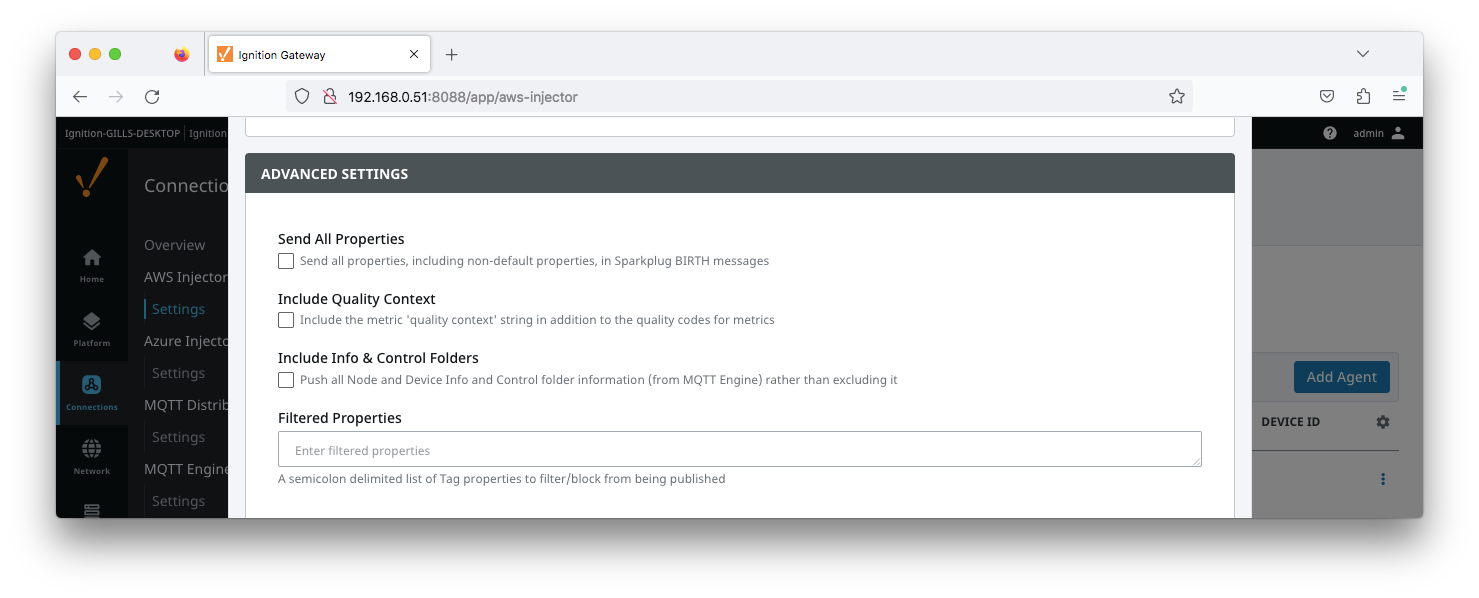
- Send All Properties - added in 4.0.25
- Send all properties, including default properties, in Sparkplug BIRTH messages
- Include Quality Context
- Include the metric 'quality context' string in addition to the quality codes for metrics
- Include Info & Control Folders - added in 4.0.30
- Push all Node and Device Info and Control folder tags from MQTT Engine
- Filtered Properties
- A semicolon delimited list of Tag properties to filter/block from being published. These should typically not be modified unless there is an explicit requirement that a specific property is needed to be added or removed from the default.
...